

RustDesk APK 1.4.2

Advertisement
RustDesk APK gives you free, secure, and open-source remote access for Android. Control your devices, transfer files, and manage work safely without ads or subscriptions.
Information of RustDesk
| Name | RustDesk |
|---|---|
| Updated | |
| Compatible with | Android 5.0+ |
| Last version | 1.4.2 |
| Size | 23 MB |
| Category | Tools |
| Developer | CarrieZ Studio |
| Price | Free |
| MOD | No MOD |
About RustDesk
RustDesk APK – Free, Secure & Open-Source Remote Access
In today’s connected world, you deserve a remote-desktop tool that respects both your privacy and your productivity. RustDesk APK delivers exactly that — a free, secure, and open-source way to control your devices from anywhere.
Unlike commercial apps that require subscriptions or cloud sign-ins, RustDesk puts you in full control. You decide where your data goes, who can access it, and how your devices connect. Whether you’re fixing a colleague’s computer, transferring important files, or working on a server from your phone, RustDesk turns Android into a trusted control center.
What Is RustDesk APK?
RustDesk is a cross-platform remote-desktop solution built with the Rust programming language, celebrated for its performance and safety. It was designed to replace complex cloud-based tools with a lightweight, peer-to-peer system that connects devices directly and securely.
Developed by Purslane Ltd together with an active open-source community, RustDesk began in 2020 when many users were frustrated by expensive licensing and privacy concerns in popular remote-access software. Its philosophy is simple: your connection, your data, your rules.
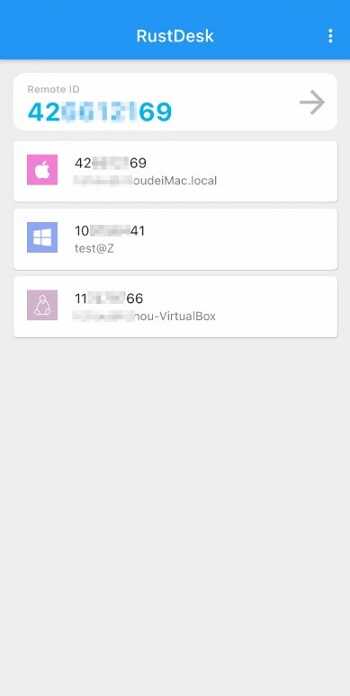
The Android release — RustDesk APK — extends that philosophy to mobile users. You can connect an Android phone or tablet to computers running Windows, macOS, Linux, iOS, or even a web client. With one quick setup, you can share your screen, transfer files, or provide live technical help, all without handing your information to third-party servers.
“Remote access that belongs to you — not to someone else’s server.”
Key Features That Make RustDesk Stand Out
Every great tool is defined by how well it serves its users. The following features show why RustDesk APK has become one of the most trusted names in secure remote access.
Secure End-to-End Encryption for Total Privacy
RustDesk encrypts every data stream using the NaCl library, a modern cryptographic standard known for reliability and speed.
-
Each session is end-to-end encrypted, so only the connected devices can read it.
-
No log files, no background tracking, no external storage.
-
Even if traffic passes through a relay, it stays unreadable to everyone else.
Your work, files, and screen remain completely private — as they should be.
Full Remote Control from Your Android Device
Control your desktop directly from your phone, just like sitting in front of it.
RustDesk gives you two intuitive control styles:
-
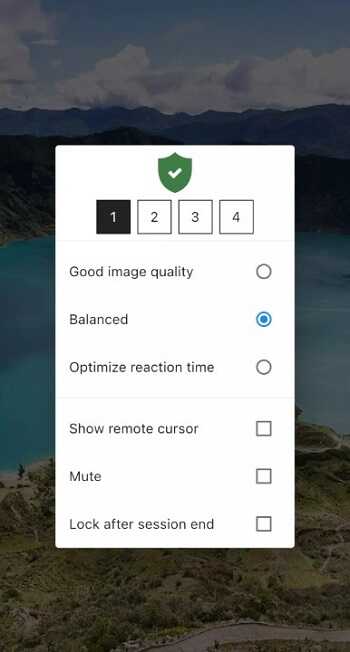
Mouse Mode – precision pointer control for editing, design, or coding.
-
Touch Mode – natural gestures for quick navigation and everyday use.
Switch freely between the two modes. Each swipe, scroll, and click feels responsive, even on low-latency networks.
Self-Hosted ID Server for Maximum Data Control
Privacy-first users or organizations can host their own ID and relay servers. This means:
-
All traffic stays within your internal network.
-
You comply with company or industry security standards.
-
No reliance on public servers — you’re the administrator of your infrastructure.
This self-hosting option turns RustDesk into a fully sovereign solution, ideal for IT teams or advanced users who value data independence.
Cross-Platform Compatibility for Every User
RustDesk seamlessly bridges devices across systems: Android ↔ Windows ↔ macOS ↔ Linux ↔ iOS ↔ Web.
A single device ID allows instant pairing, so you can start a session within seconds — no re-registration or complicated setup.
The interface feels consistent everywhere, helping you move between devices without confusion.
Fast and Lightweight Performance Without Ads
Despite powerful encryption and streaming features, RustDesk remains compact — around 23 to 74 MB depending on the version.
-
No ads, no background trackers.
-
Hardware acceleration ensures high frame rates.
-
Adaptive codecs maintain clear visuals even on weaker networks.
This balance between speed and efficiency makes RustDesk ideal for both personal and professional use.
File Transfer and Multi-Session Management
Send or receive files securely while keeping your remote session active.
The dual-pane layout (“Local” and “Remote”) simplifies navigation: choose items, copy, and paste — it’s that simple.
You can even manage several sessions at once, switching between computers without losing progress.
Advertisement
Advertisement
Granular Permission and Access Control
RustDesk lets you fine-tune what others can access:
-
Share screen only, or allow full control.
-
Enable file transfer separately from keyboard input.
-
Re-grant permissions every time the app restarts for extra safety.
This level of control protects your privacy while keeping collaboration convenient.
Community-Driven Open-Source Development
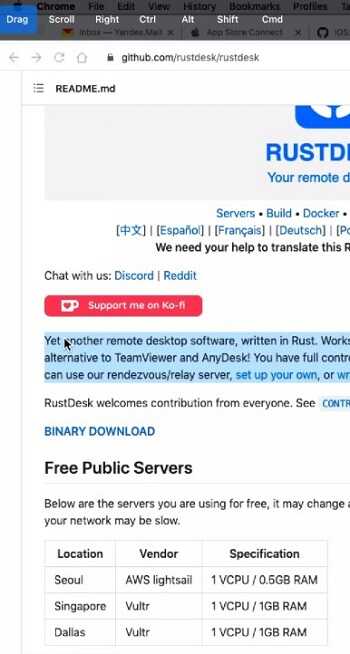
With more than 100 K stars on GitHub, RustDesk thrives through global community support.
Developers fix bugs quickly, release frequent updates, and welcome user feedback.
You don’t have to “trust” marketing claims — the source code itself proves how the app works. Transparency builds confidence.
How to Use RustDesk on Android
Getting started takes only a few minutes. Follow these steps to experience full remote access on your Android device:
-
Download the APK
Obtain the latest verified version of RustDesk APK and install it on your device. -
Install and Grant Permissions
Open the app and allow required permissions such as screen capture or file management. -
Connect to a Remote Device
On the home screen, enter the RustDesk ID and password of the target computer. After verification, you gain instant control. -
Choose Your Control Mode
Select Mouse Mode for precise pointer control or Touch Mode for intuitive taps and gestures. -
Transfer Files or Share Your Screen
Access the file-transfer tab to move data between devices or enable screen sharing for live assistance.
That’s it — no registration, no subscription. Just a direct, encrypted connection between your Android and the device you need.
Why Choose RustDesk APK Over Other Remote Apps
When users compare remote-desktop tools, three values define RustDesk: freedom, privacy, and transparency.
| Feature | RustDesk APK | TeamViewer | AnyDesk | Chrome Remote Desktop |
|---|---|---|---|---|
| Pricing | Free Forever | Limited Free Tier | Subscription Needed | Free |
| Open Source | Yes | No | No | No |
| Self-Hosting | Available | No | Partial | No |
| Ads / Tracking | None | Possible | Telemetry | None |
| Platform Support | All Major OS | All | All | Browser Only |
RustDesk doesn’t rely on closed systems or intrusive licenses. It lets you host, configure, and secure your own environment while remaining free for personal or professional use. For many users, this is the perfect balance between open innovation and practical functionality.
Performance and Security in Real Use
Performance and privacy often pull in opposite directions — stronger encryption can mean slower response. Yet RustDesk APK manages to balance both beautifully.
In real-world tests, the app maintains smooth control and sharp visuals even under 3 Mbps connections. Built-in video codecs such as H264, H265, VP9, and AV1 automatically adjust quality and bitrate to network strength, preventing lag or pixel loss.
Because RustDesk runs natively in the Rust language, it uses fewer system resources than heavy commercial tools. It starts quickly, consumes little CPU, and handles reconnections gracefully if the signal drops. Even long sessions remain stable without overheating your device.

For developers and IT technicians, this translates into genuine reliability. You can patch a server, monitor performance dashboards, or guide a client through troubleshooting — all from your Android phone.
RustDesk’s design proves that open-source software can compete head-to-head with enterprise-grade apps. It’s light, efficient, and engineered with a single goal: deliver fast remote control without compromising your data.
How RustDesk Protects Your Data and Privacy
Every connection you make through RustDesk APK is shielded by end-to-end encryption. Only the two connected devices possess the keys to decode the data stream. No central server ever sees what passes between you and your remote computer.
This architecture means:
-
No third-party cloud storage. RustDesk does not store session history, credentials, or metadata.
-
Optional self-hosting. You can install your own ID Server and Relay Server, routing all traffic internally.
-
Granular permission control. Decide exactly what to share — screen, keyboard, mouse, files, or audio.
Advertisement
Imagine showing a colleague how to configure software on your desktop: you can allow screen access while disabling file transfer. When the session ends, those permissions automatically expire.
This approach — sometimes called “privacy by design” — ensures that even the developers cannot access your content. For users who handle confidential information or remote-support environments, this independence is invaluable.
RustDesk turns privacy from a technical setting into a fundamental right.
Tips for a Better RustDesk Experience
To help you get the most out of RustDesk APK, here are a few practical tips drawn from active users and community contributors:
-
Install only verified builds. Use the official release package to guarantee authenticity and security.
-
Enable hardware acceleration. Supported devices can offload video processing to the GPU for smoother visuals.
-
Switch between Mouse Mode and Touch Mode depending on the task — precision versus quick gestures.
-
Bookmark frequent connections. Your recent device list allows one-tap reconnection without re-entering credentials.
-
Re-grant permissions on every launch. It’s a small step that keeps full control in your hands.
-
Use 64-bit builds whenever possible. They offer higher stability and better performance on modern devices.
-
Limit background apps before connecting. Freeing memory improves response time and reduces latency.
These optimizations turn a good experience into a great one — stable, fluid, and secure even during long work sessions.
Download RustDesk APK (Latest Version)
App Name: RustDesk APK
Version: 1.1.9 or newer
File Size: Approximately 70 MB
Compatibility: Android 6.0 and above
Developer: CarrieZ Studio / Purslane Ltd
Category: Remote Access & Control
Download the latest verified, ad-free version of RustDesk APK and enjoy fast, secure remote access without hidden costs or restrictions.
This latest release includes enhanced connection stability, smoother file-transfer performance, and updated encryption modules. It is lightweight enough for everyday users yet robust enough for IT administrators managing multiple systems.
Final Thoughts
In an era where digital tools often trade convenience for control, RustDesk APK stands out as a refreshing exception. It gives you the power of a professional remote-desktop suite without the baggage — no ads, no recurring fees, and no compromise on privacy.
It’s built on three clear principles:
-
Freedom. Use it whenever you want, however you want, without subscriptions or restrictions.
-
Security. Your connections are fully encrypted, and your data never leaves your possession.
-
Transparency. Open-source code and community development keep the platform honest and evolving.
RustDesk is more than an app; it’s a movement toward user-owned technology. Whether you’re a freelancer managing projects abroad, a technician helping clients, or simply someone who values digital independence, this tool adapts perfectly to your workflow.
Download RustDesk APK today and experience true freedom in secure remote access — fast, private, and entirely yours.
FAQs RustDesk
RustDesk APK is a free, open-source remote-desktop app that lets you control your computer from an Android device. You can manage files, share screens, and access other devices securely without relying on third-party servers.
Yes. RustDesk APK uses end-to-end encryption (NaCl protocol) to keep every connection private. No session data or credentials are stored externally, and you can even host your own server for complete control over your data.
Absolutely. RustDesk APK includes a built-in file-transfer system that supports two-way movement between your Android device and remote computers. It’s fast, encrypted, and works without interrupting your active session.
No account or subscription is required. Simply install the app, enter the remote device’s ID and password, and start your session instantly. RustDesk APK keeps things simple and secure for personal or professional use.
RustDesk APK is free, open-source, and ad-free, unlike most commercial tools. It offers self-hosting options, total data privacy, and smooth cross-platform performance—making it a reliable alternative for users who value security and independence.



Share Your Thoughts